How to Optimize Your B2B Landing Page in 24 Hours
Key Takeaways:
- You can significantly improve B2B landing page performance without a full redesign by focusing on a few high-impact changes.
- Clear, buyer-first messaging helps prospects quickly understand the value and take action.
- Strong alignment between ads, landing pages, and product visuals keeps prospects engaged and reduces bounce rates.
One of the biggest misconceptions about B2B landing pages is that in order to optimize them, you have to start from scratch.
However, that’s far from the truth.
You don’t need to complete a full redesign or conduct months of testing to enhance page performance. Instead, there are five minimum-effort, high-impact changes you can make to improve conversions. And the best part is that it can all be done in less than 24 hours.
Let’s explore the changes you can make to your page today for better results.
1. Fix Your Messaging
Anyone who has been part of a landing page or website project knows how daunting it can be to nail the messaging component. Everyone on the team has an opinion on how the content should sound, and the result is that the messaging gets lost.
During the back-and-forth revisions between departments, the sections become muddy, and you use a lot of real estate to essentially do nothing but confuse your prospects.
Which is why fixing your messaging is one of the quickest ways to improve your landing page conversions.
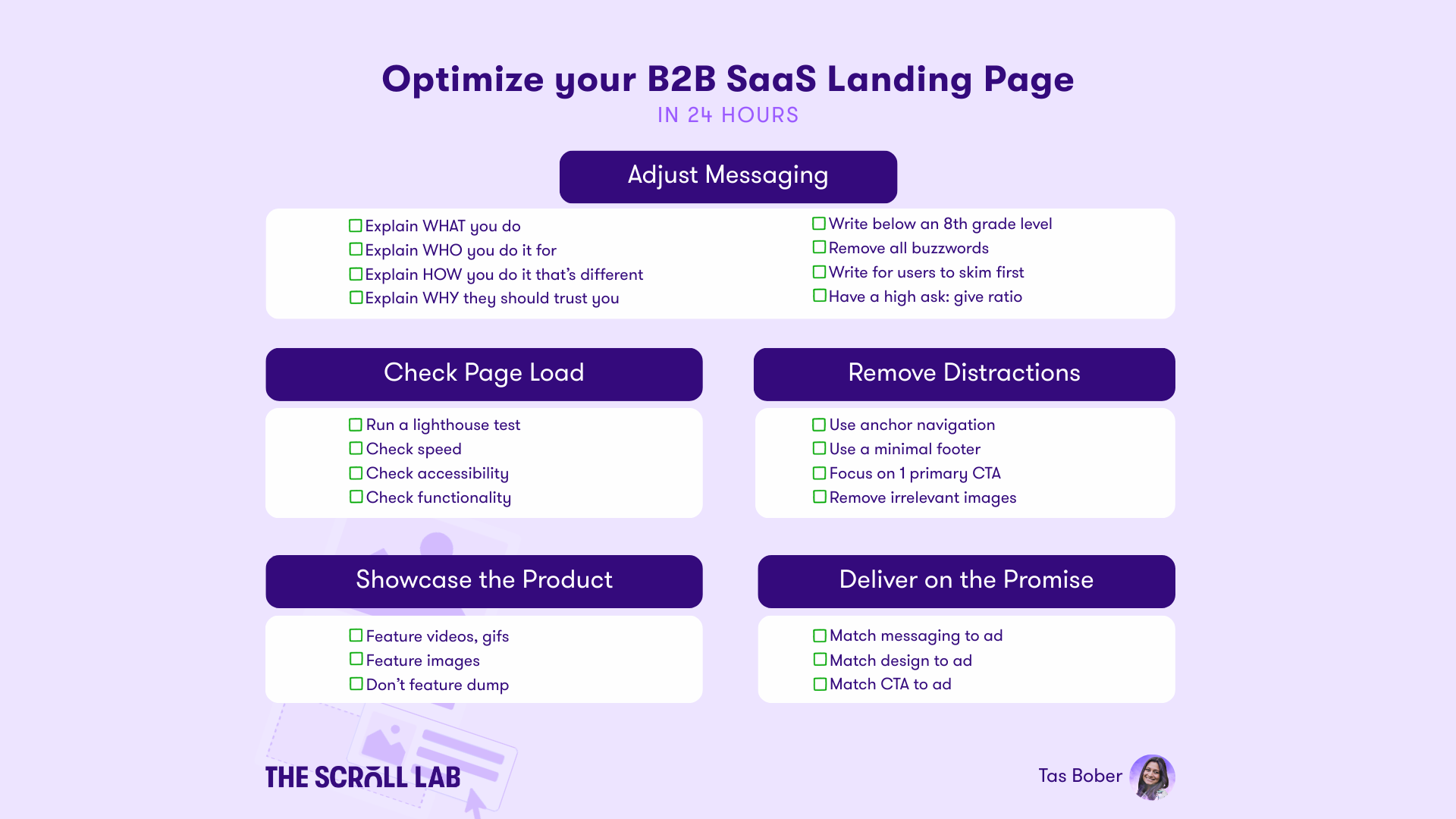
Your top priority should be to get to clarity as quickly as possible. Someone who lands on your page should be able to skim it and answer the following:
- What does your product do?
- Who is it for?
- How is it different?
- Why should they trust your brand?
- How much do you cost (even a starting range)?
- What is the process after they decide to engage with you?
If your current landing page doesn’t answer these questions quickly, then it’s time to start rewriting. Or, if you’re unsure about current copy, try these three tests:
- Headline Test: If a user were to read only the headlines on your landing page, would they understand what it was about?
- Grade Level Test: Am I writing at an eighth-grade level or below? Even if users are smarter than this, the brain is efficient and tends to retain information at this grade level or below.
- Buzzword Test: Using AI, you can put the copy of your landing page in there and ask it to count how many buzzwords you’ve used. Then replace them with more layman’s terms.
2. Run a Lighthouse Test
Many people baulk at the idea of doing any technical work on their landing page, especially if they don’t have a dev background.
The good news?
You don’t need any development experience to run a lighthouse test. In fact, all you need to do is:
- Right-click on your landing page
- Click “Inspect”
- Click “Lighthouse”
- Run the report
Once you have the report in hand, you can start reviewing metrics such as performance, accessibility, and best practices.
Often, one of the biggest killers of conversion is speed. If you notice your site is taking longer than 3 seconds to load, that’s a problem. You’ll want to send it to your dev team right away so they can look into it.
3. Remove Distractions
There’s no hiding that most B2B landing pages try to do too much. But distractions kill momentum, and all the fancy transitions or animations can actually harm your conversions.
Below are some of the easiest ways to clarify your landing page and remove distractions:
- Replace your full website navigation with an anchor nav
- Minimize the footer to only include what’s absolutely necessary
- Focus on one primary CTA, and a secondary softer sell at the bottom
- Remove unnecessary images (like stock imagery) that don’t tell the story
It may feel awkward, but it is better to nail a clear message than to cram everything on one page.
4. Showcase the Product
How many people have landed on a page and noticed the product page lists every. single. feature.
While you definitely want to highlight the benefits of your product and some of the ways it helps prospects, you don’t want to feature dump. Giving potential customers too much information can actually kill engagement and overwhelm them.
Instead, choose strategic visuals that bring the product to life, including:
- Short videos
- Animated gifs
- Feature-specific screenshots
When selecting a visual, it should add to the story. So, don’t just add visuals to have them on the site. Instead, choose product imagery, interactive demos, or a well-designed product screenshot that will add value to the picture you’re trying to paint.
Each audience will have its own selling points, so it’s important to match the use case to the ICP you’re targeting. Your goal should be to make it easy for a prospect to picture how the product works and fits into their world.
5. Match the Ad Experience
Most B2B companies fail to carry the key messaging from their ads into their dedicated landing pages. However, having your paid ads say one thing and your landing page say something else can cause a quick bounce session.
For example, imagine you’re searching for pants, and see an Old Navy ad for pants, but after clicking on the ad, you get dumped onto the Old Navy homepage. Your first instinct is probably to leave the site and go back to the search results for pants.
The best way to avoid the misfire is to check for:
- Messaging alignment
- Visual continuity
- CTA consistency
If the ad promises something, the landing page needs to deliver on it immediately. Otherwise, the bounce rate will tell you everything you know about why your conversions are down.
6. Optimize for Better Landing Page Conversion
B2B organizations always assume it takes hundreds of hours to optimize landing pages. But, in reality, it can be done in less than 24.
So, as you plan out your next landing page optimization session, run through the following checklist of elements you need:
- Clear, buyer-first messaging
- A fast, technically sound page
- Focused design that eliminates friction
- Product visuals that connect
- Alignment across the journey
FAQs
1. Do I need to redesign my landing page to improve conversions?
No, most conversion gains come from small, high-impact changes rather than a full redesign.
2. What should visitors understand immediately when they land on the page?
They should quickly know what the product does, who it’s for, how it’s different, and why they should trust it.
3. How does page speed affect landing page performance?
Slow load times increase bounce rates, and pages that take longer than a few seconds to load often lose conversions.
4. Why is removing distractions so important on B2B landing pages?
Extra navigation, multiple CTAs, and unnecessary visuals pull attention away from the primary action you want visitors to take.
5. Why should landing page messaging match paid ads?
When a page doesn’t deliver on the ad's promises, visitors leave quickly and conversion rates drop. Google also recently released a new compliance standard under which the platform won’t show your ads if your messaging isn’t consistent between the landing page and the paid ad.